Open Ticket Announcements Contact Us
Login Register
Avalon Hosting Services
  • 0 Shopping Cart
  • Dashboard
  • Store
    • Browse All
    • Dynamic D Individual (Gen 1)
    • Dynamic D Individual (Gen 2)
    • Dynamic D Individual (Gen 4)
    • Dynamic D Business (Gen 1)
    • Dynamic D Business (Gen 2)
    • Dynamic D Business (Gen 4)
    • WHOIS Lookup
    • Wordpress Hosting
    • Woocommerce Hosting
    • Dedicated Server
    • SSL Certificates
    • SiteLock
    • CodeGuard
    • Avalon Software
    • Google Workspace
    • Virtual Private Server (VPS)
    • Virtual Dedicated Server (VDS)
    • Titan Email
    • SSL Certificates
    • Website Security
    • Website Backup
    • E-mail Services
    • Professional Email
    • Site & Server Monitoring
    • VPN
    • SocialBee
    • Register a New Domain
    • Transfer Domains to Us
  • Announcements
  • Knowledgebase
  • Service Status
  • Affiliates
  • Contact Us
  • More
  • Account
    • Login
    • Register
    • Forgot Password?
  1. Portal Home
  2. Knowledgebase
  3. CloudLinux (cPanel)
  4. How to Enable or Disable PHP's allow_url_fopen using CloudLinux Selector in cPanel?

  Categories

Backup/Restore
4
Client Area
1
Cloudflare (cPanel)
9
CloudLinux (cPanel)
10
cPanel
4
cPanel - Control Panel
24
Databases
11
DirectAdmin
48
DNS - Nameservers
6
Domain Management
10
Email
17
FTP
9
Installing a Control Panel
6
Mail Filters & SPAM
8
Mobile
11
Others
3
PayPal
7
Plesk
47
Security
10
SiteWorx (Control Panel)
61
Softaculous
76
SolusVM
18
SSL
5
Virtualizor
19
WHM
18
WordPress
17

  Categories

  Tag Cloud

Avalon cPanel how to Step by Step guideline

  Support

My Support Tickets
Announcements
Knowledgebase
Downloads
Network Status
Open Ticket

How to Enable or Disable PHP's allow_url_fopen using CloudLinux Selector in cPanel? Print

  • 0


You can use CloudLinux Selector to enable or disable the allow_url_fopen directive in cPanel.


1. Log into your cPanel account.

2. In the Software section, click the Select PHP Version.

cP-CL-Select-PHP-Version-icon.gif


3. Click on the Options menu.

CL-options-menu.gif

Note: If the Options page shows an error related to the native PHP version, change it to a non-native version first.


4. For enabling allow_url_fopen, tick mark it. For disabling it, uncheck it.
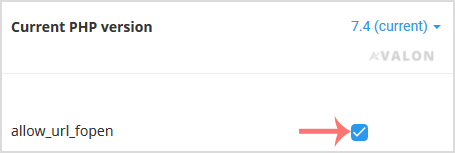
CL-fopen-enable-disable.gif


Was this answer helpful?

Related Articles

How to Change the PHP Version via CloudLinux Selector in cPanel?   You can use CloudLinux's Select PHP Version to change your website's PHP Version. CloudLinux... How to Enable ionCube Loader using CloudLinux Selector in cPanel?   You can use CloudLinux Selector to enable ionCube Loader in cPanel.   1. Log into your... How to Enable the GD extension of PHP using CloudLinux Selector in cPanel?   You can use CloudLinux Selector to enable GD extension in PHP via cPanel.   1. Log into your... How to Enable the Mailparse Extension of PHP Using CloudLinux Selector in cPanel?   You can use CloudLinux Selector to enable the Mailparse extension in PHP via cPanel.   1.... How to Enable or Disable PHP Extensions Using the CloudLinux Selector in cPanel?   You can use CloudLinux Selector to enable or disable available PHP extensions in cPanel....
« Back

  Tag Cloud

Avalon cPanel how to Step by Step guideline

  Support

My Support Tickets
Announcements
Knowledgebase
Downloads
Network Status
Open Ticket
Avalon Hosting Services

Enterprise-grade hosting services built for reliability, security, and predictable growth.

System Status: All primary services operational

Trusted payment methods and verified global infrastructure partners.

Get Avalon Hosting Services App on Google Play

Services

  • Contact Us
  • Announcements
  • Knowledgebase
  • Network Status
  • Client Area
  • Open Ticket
  • Shopping Cart
  • Terms of Service

Hosting

  • VPS hosting
  • Dynamic D hosting
  • VDS hosting
  • Dedicated servers
  • WordPress hosting
  • eCommerce hosting

Business Services

  • SSL certificates
  • Security and privacy
  • NordVPN privacy
  • Business email
  • Migration services
  • Monitoring and uptime

Legal

  • Terms of Service
  • Privacy Policy
  • Cookie Policy
  • Refund Policy
  • Disclaimer

Partners

  • Affiliates
  • Reseller hosting
  • Domain reseller
VISA AMEX PayPal ₿
Copyright © 2007 - 2026 Avalon Hosting Services. All Rights Reserved. Security-first infrastructure with round-the-clock support.

Loading...
Loading...
Choose language
العربية
Azerbaijani
Català
中文
Hrvatski
Čeština
Dansk
Nederlands
English
Estonian
Persian
Français
Deutsch
עברית
Magyar
Italiano
Macedonian
Norwegian
Português
Português
Română
Русский
Español
Svenska
Türkçe
Українська

Choose Currency

$ USD
₹ INR
‎৳ BDT
£ GBP
€ EUR
$ AUD
AED AED
¥ JPY
$ CAD
$ SGD
₽ RUB
¥ CNY

Generate Password

Please enter a number between 8 and 64 for the password length