
Open Ticket Announcements Contact Us
Login Register
Avalon Hosting Services
  • 0 Shopping Cart
  • Dashboard
  • Store
    • Browse All
    • Dynamic D Individual (Gen 1)
    • Dynamic D Individual (Gen 2)
    • Dynamic D Individual (Gen 4)
    • Dynamic D Business (Gen 1)
    • Dynamic D Business (Gen 2)
    • Dynamic D Business (Gen 4)
    • Wordpress Hosting
    • Woocommerce Hosting
    • Dedicated Server
    • SSL Certificates
    • SiteLock
    • CodeGuard
    • Avalon Software
    • Google Workspace
    • Virtual Private Server (VPS)
    • Virtual Dedicated Server (VDS)
    • Titan Email
    • SSL Certificates
    • Website Security
    • Website Backup
    • E-mail Services
    • Professional Email
    • Site & Server Monitoring
    • VPN
    • SocialBee
    • Register a New Domain
    • Transfer Domains to Us
  • Announcements
  • Knowledgebase
  • Service Status
  • Affiliates
  • Contact Us
  • Products Reseller Area
  • More
  • Account
    • Login
    • Register
    • Forgot Password?
  1. Portal Home
  2. Knowledgebase
  3. Email
  4. Outlook 2019
  5. How to Reply to an Email in Outlook 2019?

  Categories

Backup/Restore
4
Client Area
1
Cloudflare (cPanel)
9
CloudLinux (cPanel)
10
cPanel
4
cPanel - Control Panel
24
Databases
11
DirectAdmin
48
DNS - Nameservers
6
Domain Management
10
Email
110
FTP
9
Installing a Control Panel
6
Mail Filters & SPAM
26
Mobile
11
Others
3
PayPal
7
Plesk
47
Security
15
SiteWorx (Control Panel)
61
Softaculous
76
SolusVM
18
SSL
5
Virtualizor
19
WHM
18
WordPress
17

  Categories

  Tag Cloud

A record account aliases api apple-mail authentication automation Avalon Barracuda best practices billing black friday blacklist branding bulk email business email business email compromise calendar cart recovery certificates cloud security comparison compliance contacts cPanel data privacy data-hosting deliverability developer-tools device-setup devices devops dkim dmarc dns DNS records DNS setup domain age domain management domain registration domain reputation domain selection domain settings domain warm-up drive ecommerce email email alias email authentication email basics email client email compliance email deliverability email delivery email headers email hosting email management email marketing email security email sending email setup email spoofing email troubleshooting email-security email-setup encryption error 535 error 550 error codes esmtp faq file-sharing files gdpr getting-started gmail google postmaster tools google workspace holiday sales hosting how to inbox management inbox placement IP IP reputation ipv4 ipv6 kubernetes list hygiene mac mail queue mail server microsoft 365 migration MIME types monitoring MX record networking nodejs nordvpn nvm office 365 organization outlook ox-app-suite phishing phishing prevention prevention productivity promotions tab propagation PTR record rDNS removal reverse DNS search security segmentation sender reputation sending limits settings setup setup guide SMTP smtp settings SORBS spam spam complaints spam prevention spam trap SpamCop Spamhaus spf ssl starttls Step by Step guideline subdomains support team collaboration tls troubleshooting TTL tutorial unified-inbox unsubscribe vpn windows yahoo mail

  Support

My Support Tickets
Announcements
Knowledgebase
Downloads
Network Status
Open Ticket

How to Reply to an Email in Outlook 2019? Print

  • 0


You can reply to emails using Outlook 2019 instead of cPanel Webmail.


1. Open Outlook 2019.

Outlook-2019-icon.gif


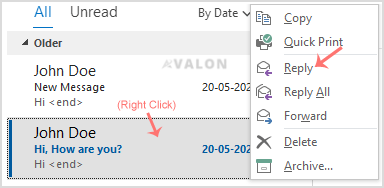
2. Right click on the email you would wish to reply to.
Outlook-reply-email.gif


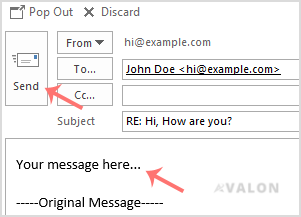
3. On the right side, the response box will open. Enter your message and click Send.
Outlook-reply-final.gif


Was this answer helpful?

Related Articles

How to Check for New Email in Outlook 2019?   1. Open Outlook 2019.   2. In the left panel, you can see a list of your email accounts.... How to Delete Email Messages in Outlook 2019?   If you want to remove email from Outlook 2019, you can easily do so. However, if you use POP,... How to Forward Email in Outlook 2019?   You can forward the email to other email accounts using Outlook 2019.   1. Open Outlook... How to Send Email Using Outlook 2019?   You can send email using Outlook 2019. It is quite straightforward because you do not need to... How to Set up a cPanel Email Account with Outlook 2019?   You can set up a cPanel email account with Microsoft Outlook 2019 and manage your email...
« Back

  Tag Cloud

A record account aliases api apple-mail authentication automation Avalon Barracuda best practices billing black friday blacklist branding bulk email business email business email compromise calendar cart recovery certificates cloud security comparison compliance contacts cPanel data privacy data-hosting deliverability developer-tools device-setup devices devops dkim dmarc dns DNS records DNS setup domain age domain management domain registration domain reputation domain selection domain settings domain warm-up drive ecommerce email email alias email authentication email basics email client email compliance email deliverability email delivery email headers email hosting email management email marketing email security email sending email setup email spoofing email troubleshooting email-security email-setup encryption error 535 error 550 error codes esmtp faq file-sharing files gdpr getting-started gmail google postmaster tools google workspace holiday sales hosting how to inbox management inbox placement IP IP reputation ipv4 ipv6 kubernetes list hygiene mac mail queue mail server microsoft 365 migration MIME types monitoring MX record networking nodejs nordvpn nvm office 365 organization outlook ox-app-suite phishing phishing prevention prevention productivity promotions tab propagation PTR record rDNS removal reverse DNS search security segmentation sender reputation sending limits settings setup setup guide SMTP smtp settings SORBS spam spam complaints spam prevention spam trap SpamCop Spamhaus spf ssl starttls Step by Step guideline subdomains support team collaboration tls troubleshooting TTL tutorial unified-inbox unsubscribe vpn windows yahoo mail

  Support

My Support Tickets
Announcements
Knowledgebase
Downloads
Network Status
Open Ticket
Avalon Hosting Services

Enterprise-grade hosting services built for reliability, security, and predictable growth.

System Status: All primary services operational

Trusted payment methods and verified global infrastructure partners.

Get Avalon Hosting Services App on Google Play

Services

  • Contact Us
  • Announcements
  • Knowledgebase
  • Network Status
  • Client Area
  • Open Ticket
  • Shopping Cart
  • Terms of Service

Hosting

  • VPS hosting
  • Dynamic D hosting
  • VDS hosting
  • Dedicated servers
  • WordPress hosting
  • eCommerce hosting

Business Services

  • SSL certificates
  • Security and privacy
  • NordVPN privacy
  • Business email
  • Migration services
  • Monitoring and uptime

Legal

  • Terms of Service
  • Privacy Policy
  • Cookie Policy
  • Refund Policy
  • Disclaimer

Partners

  • Affiliates
  • Reseller hosting
  • Domain reseller
VISA AMEX PayPal ₿
Copyright © 2007 - 2026 Avalon Hosting Services. All Rights Reserved. Security-first infrastructure with round-the-clock support.

Loading...
Loading...
Choose language
العربية
Azerbaijani
Català
中文
Hrvatski
Čeština
Dansk
Nederlands
English
Estonian
Persian
Français
Deutsch
עברית
Magyar
Italiano
Macedonian
Norwegian
Português
Português
Română
Русский
Español
Svenska
Türkçe
Українська

Choose Currency

$ USD
₹ INR
‎৳ BDT
£ GBP
€ EUR
$ AUD
AED AED
¥ JPY
$ CAD
$ SGD
₽ RUB
¥ CNY

Generate Password

Please enter a number between 8 and 64 for the password length
